PDF p. 2037 · 23-E-11
- 1.Remove the armrest pocket (see section 20).
- 2.Disconnect the 5P connector then remove the mounting screws from the switch.
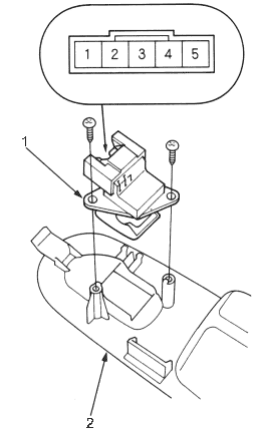
- 1. REAR WINDOW SWITCH
- 2. ARMREST POCKET
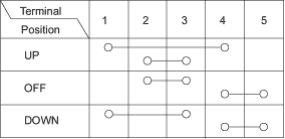
- 3.Check for continuity between the terminals in each switch position according to the table.
Rear Window Motor Test
- 1.Remove the rear door panel (see section 20).
- 2.Disconnect the 2P connector from the window motor.
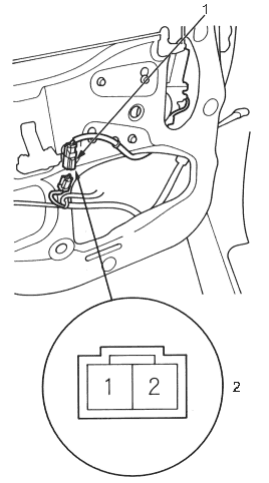
- 1. 2P CONNECTOR
- 2. Terminal side of male terminals
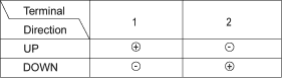
- 3.Test the motor in each direction by connecting battery power and ground according to the table.
- 4.If the motor does not run or fails to run smoothly, replace it.