PDF p. 1047 · 21-12
NOTE: LHD type is shown, RHD type is symmetrical.
- 1.Remove the centre panel (see section 20)
- 2.Remove the self-tapping screws and the recirculation control/A/C switch from the centre panel.
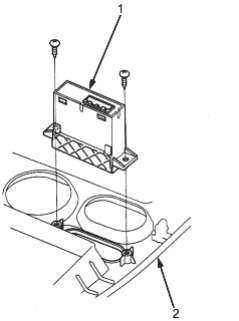
- 1. RECIRCULATION CONTROL/A/C SWITCH
- 2. CENTRE PANEL
- 3.Install in the reverse order of removal. After installation, operate the recirculation control/A/C switch to see whether it works properly.
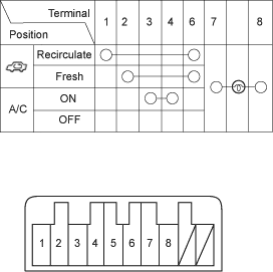
Test
Check for continuity between the terminals in each switch position according to the table.