PDF p. 541 · 13-67
- 1.Remove the retaining plate from the clutch housing.
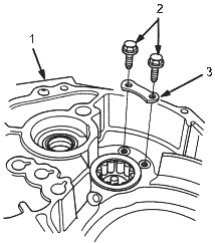
- 1. CLUTCH HOUSING
- 2. Replace
- 3. RETAINING PLATE
- 2.Remove the needle bearing using the special tool, then remove the oil guide plate.
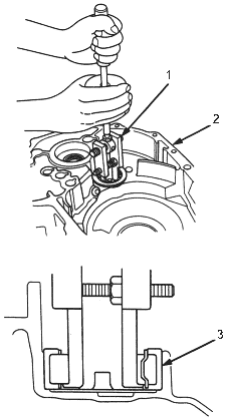
- 1. ADJUSTABLE BEARING REMOVER SET, 07JAC-PH80000
- 2. CLUTCH HOUSING
- 3. NEEDLE BEARING
- 3.Position the oil guide plate.
- 4.Drive the needle bearing using the special tools as shown.
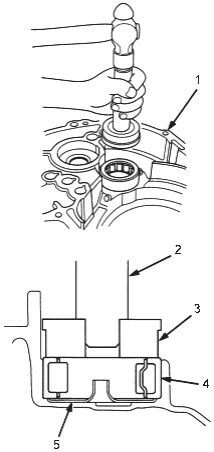
- 1. CLUTCH HOUSING
- 2. HANDLE DRIVER, 07749-0010000
- 3. DRIVER ATTACHMENT, 62 x 68 mm, 07746-0010500
- 4. NEEDLE BEARING
- 5. OIL GUIDE PLATE
- 5.Install the retaining plate and stake the bolt heads into the groove in the retaining plate.
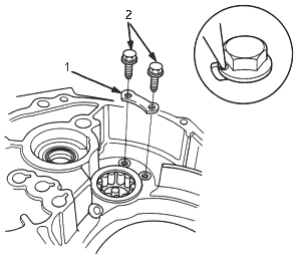
- 1. 6 x 1.0 mm, 12 Nm (1.2 kgf/m, 8.7 lbf/ft)
- 2. RETAINING PLATE