PDF p. 1817 · 11-36
If the MIL (Malfunction Indicator Lamp) has come on
- 1.Start the engine and check the MIL.
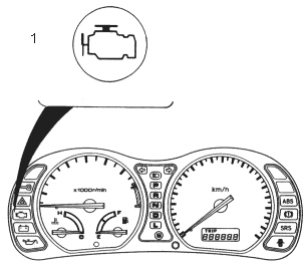
- 1. MALFUNCTION INDICATOR LAMP (MIL)
- 2.If the MIL stays on, turn the ignition switch OFF and connect the Honda PGM Tester or a scan tool to the 16P Data Link Connector (DLC) located under the dash on the passenger’s side of the car.
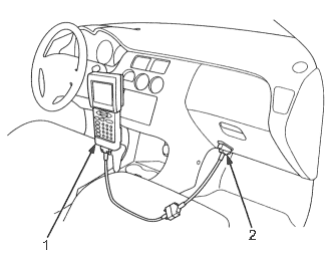
- 1. SCAN TOOL or HONDA PGM TESTER
- 2. DATA LINK CONNECTOR (16P)
The illustration shows LHD type.
RHD type is symmetrical.
- 3.Turn the ignition switch ON (II).
- 4.Check the Diagnostic Trouble Codes (DTC) and note it. Also check the freeze frame data. Refer to the DTC Troubleshooting Index and begin the appropriate troubleshooting procedure.
NOTE:
- Freeze frame data indicates the engine conditions when the first malfunction, misfire or fuel trim malfunction was detected.
- The scan tool and the Honda PGM Tester can read the DTC, freeze frame data, current data, and other ECM/PCM data.
- For specific operations, refer to the user’s manual that came with the scan tool or Honda PGM Tester. If the MIL did not come on
If the MIL did not come on but there is a driveability problem, refer to the Symptom Troubleshooting Index (See Page 11-42).
If you cannot duplicate the DTC
Some of the troubleshooting in this section requires you to reset the Engine Control Module (ECM) Powertrain Control Module (PCM) and try to duplicate the DTC. If the problem is intermittent and you cannot duplicate the code, do not continue through the procedure. To do so will only result in confusion and, possibly, a needlessly replaced ECM/PCM.